Sight Reading Factory Adds New Feature: Quests

Yesterday, I saw a Reel on Facebook from our very good friends at Sight Reading Factory showing a brand new feature called Quests. It is awesome. Music educators are always looking for that “next thing” to help engage their students, reinforce their skills, and make sight-reading practice feel less like a chore and more like an adventure. Quests adds a game-infused layer to their already robust sight-reading platform, and promises to deepen student engagement and boost musicianship. As the students that are in our classrooms are already well-versed on the idea of quests and streaks - especially with their games and social media use - I think that the students will love this. So what is a “Quest”? Think of it as a badge system: a sequence of sight-reading exercises where students can earn a badge for meeting several criteria (listed below). Here’s the short teaser video they posted:
Here’s how it works:
When you launch Sight Reading Factory, you will now see a new button on the left navigataion menu called Quests.
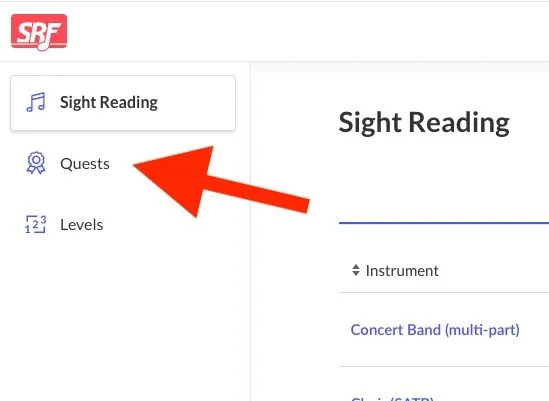
When you click Quests, you’ll get to a brand new dashboard that looks like this:
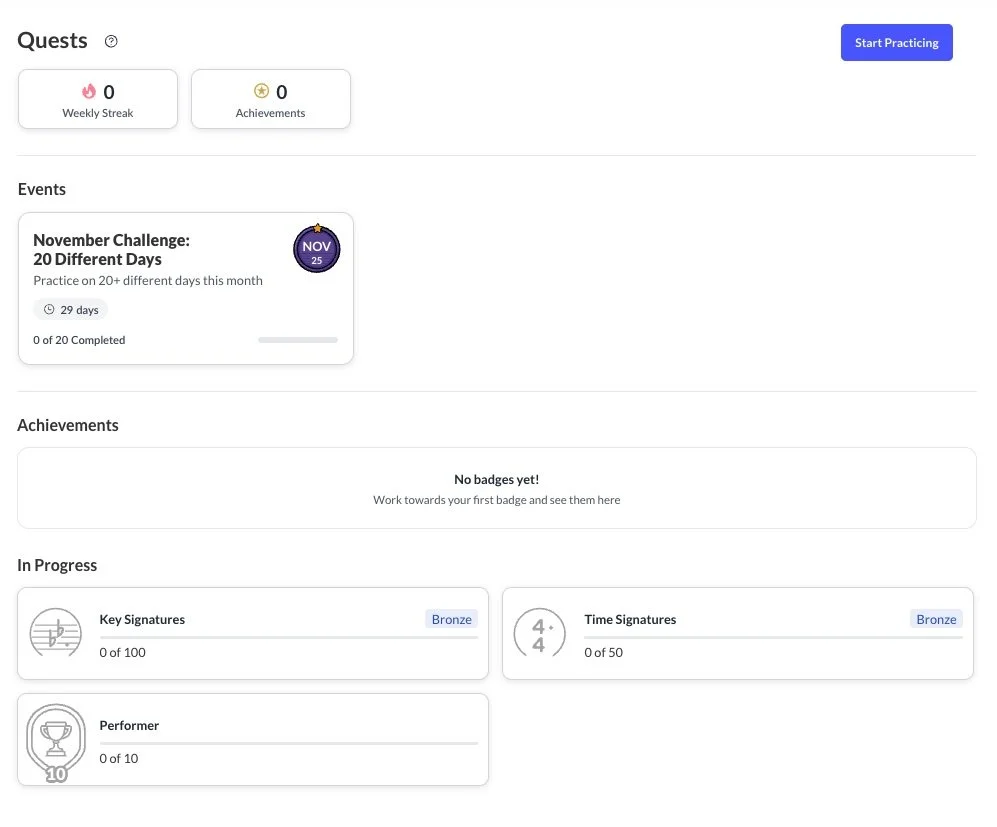
Next click Start Practicing and away you go!
Students can access Quests when they login to their accounts and for now, Quests are essentially just a badge system for students. To earn a badge, they need to do the following:
Use the Auto Assessment feature
Complete an exercise that is longer than 4 measures
Get a score over 90%
Complete it on your first attempt
At the moment, there is no teacher-student interaction - so you can’t assign your students a Quest yet Hopefully one day!
That said, we can dream, can’t we? Here are a few ways that I would use Quests if there was the ability to assign students a Quest, and if I was still teaching middle school:
Warm-Up Quest
Use a Quest as your structured weekly sight-reading warm-up routine.
How it works:
Create a Quest with 3–5 short exercises (in increasing difficulty).
Students complete one each day as part of your warm-up block.
Track progress & celebrate completion on Friday.
Chair-Placement or Audition Prep Quest
Use Quests to prepare students for chair placement, honor band auditions or playing tests.
How it works
Assign a Quest aligned to your assessment criteria (key, level, tempo).
Students practice progressively leveled exercises leading up to the test.
Reward completion with bonus points or recognition.
Section Challenge
You can use Quests as a basis of a friendly team-based competition—section vs. section.
How it works
Assign the same Quest to each section (flutes, clarinets, brass, etc.).
Students complete it independently or during sectional rehearsal time.
Award section points for completion, accuracy, and improvement.
From a pedagogical standpoint, I think this new feature is really great on a number of levels, and has amazing potential. One of the first things that I thought of was motivation. Let’s face it — some students will do anything to avoid sight-reading. But when you frame it as “complete the Quest to unlock the next level” or “gain XP (experience points) for exceeding your accuracy benchmark,” you might tap into intrinsically motivating your students. It also lends itself perfectly to differentiation. One of our perennial challenges in band, orchestra, and choir is meeting students where they are while still moving the ensemble forward. With Quests, you can scaffold beginner, intermediate, and advanced tracks — each Quest tailored to the student’s readiness — yet still allow individuals to see their own pathway, not just the group’s. From an outcome standpoint, this is really valuable data & feedback for both you AND your students. SRF already offers strong generative sight-reading algorithms and auto-assessment tools, giving students instant feedback on rhythm, pitch, intonation and timing. When you add Quests, students can see how they are performing not just on isolated exercises but across a sequence — encouraging self-reflection and growth. And last but certainly not least, this new feature has practical in-class application, like the ones I have mentioned above. You can use Quests for warm-ups, sectionals, home practice or assessment days. For example: assign a Quest that spans five exercises over one week; track who completes them, reflect together in class, and reward those who meet the challenge. This keeps sight-reading fresh and meaningful.
The addition of Quests to Sight Reading Factory is a timely innovation for our music classrooms. It aligns with what we know works—consistent, scaffolded practice plus timely feedback—and packages it in a student-friendly, engaging format. I am always impressed with how Don Crafton and his team continually work to improve their product and make it even more useful for teachers and students. It’s one of MANY reasons that we added their software to the MusicFirst Classroom over 10 years ago. Well done SRF!
If you would like to try out Sight Reading Factory inside of the MusicFirst Classroom, just sign up for a FREE 30-day trial, and start your very own sight reading quest today!